
This document will describe the steps required to install and configure the Warehouse Insight application for Business Central SaaS.
For additional assistance, contact Support:
E-Mail: su*****@***ms.com
Phone: 1-877-440-7543
Architecture
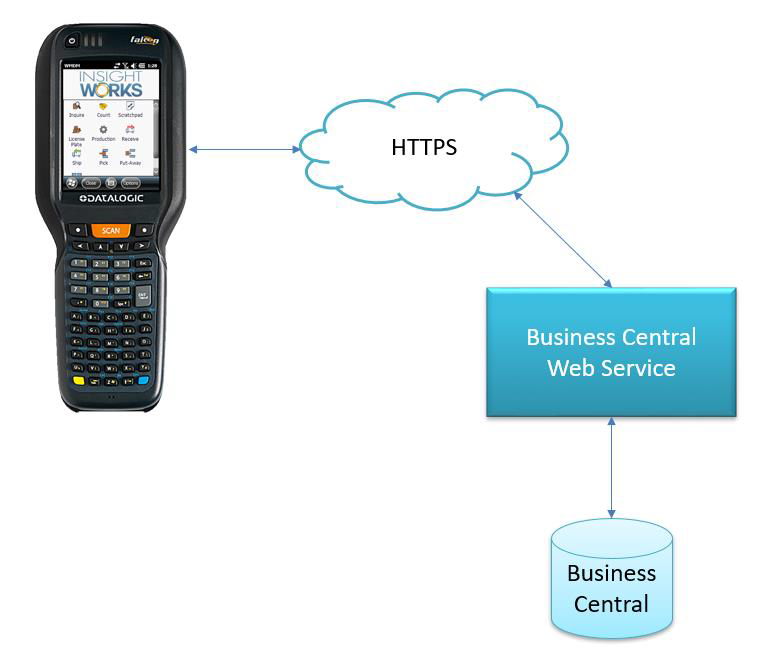
The following illustration indicates the general architecture of the product.
Business Central License Requirements
Each user using Warehouse Insight must have a valid Software License (Essential, Premium, or Device).
Supported Languages
Warehouse Insight targets the following languages (in Business Central):
- Danish
- Dutch
- Dutch (Belgium)
- English
- English (Australian)
- English (Canadian)
- English (United Kingdom)
- English (New Zealand)
- Estonian
- Finnish
- French
- French (Belgium)
- French (Canadian)
- French (Swiss)
- German
- German (Austrian)
- German (Swiss)
- Icelandic
- Italian
- Italian (Swiss)
- Norwegian
- Spanish
- Spanish (Mexico)
- Swedish
Supported Operating Systems
Warehouse Insight runs on the following device operating systems:
- Android 5.0 and higher (version 2)
- Android 8.0 and higher (version 3 and newer)
Note that even if a device is running a supported version of Android, it may still require testing to verify compatibility. Most device models from Honeywell, Datalogic, Zebra, Cipherlab, and Keyence have all been tested and verified to work with Warehouse Insight.
Still need help?
Ask other Business Central users in the Insight Works community, or send the details to the support team. Include the steps you took and any error message you saw.