

Order Fulfillment Worksheet for Microsoft Dynamics 365 Business Central
Know what you can ship today
Optimize your order fulfillment process by focusing on in-stock orders.
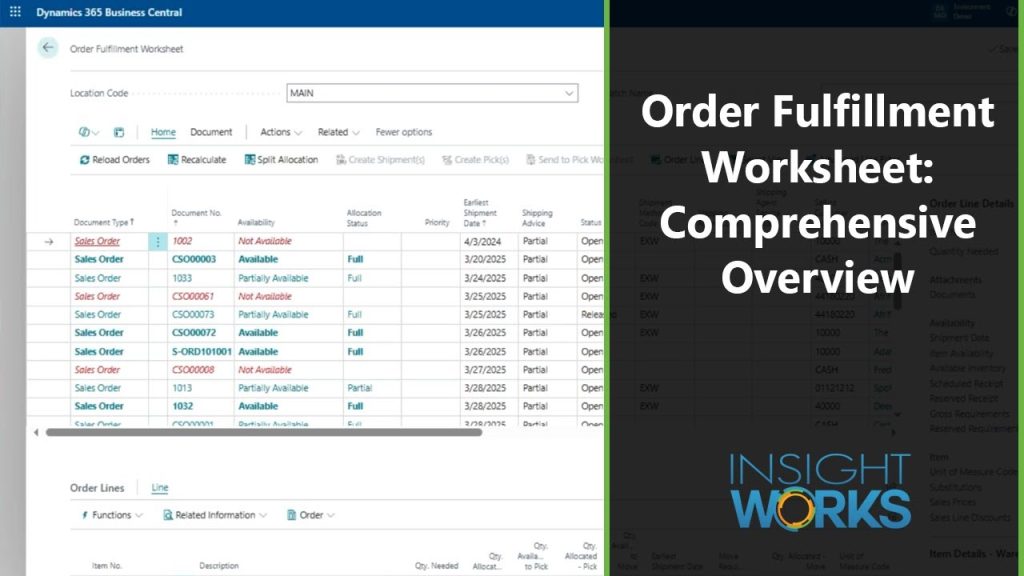
Order Fulfillment Worksheet answers one question in Microsoft Dynamics 365 Business Central: what can we ship today? It reads every sales and transfer order for a location, allocates available stock across them in the order you set, and creates the warehouse shipments and picks to act on it, on request or on a schedule through the Business Central job queue.
- Cloud and on-premises
- Licensed per company
- Rating on Microsoft Marketplace
- 4.4
- Installs
- 1,000+
Order Fulfillment Worksheet resources
How Order Fulfillment Worksheet helps
Allocation
Stop sending pickers after stock that is not there
Checking availability one order at a time, or sending pickers out with a stack of paper, means shortages are found on the floor. Two orders can both look shippable when only one unit is on the shelf.
Order Fulfillment Worksheet allocates inventory down the list, deducting as it goes, so each unit counts once. Each order shows as Available, Partially Available, Not Available, or needing a move first, and Split Allocation spreads limited stock evenly across the displayed orders instead.
See all Order Fulfillment Worksheet features ↓Picks and shipments
Create shipments and picks for the orders that can ship
Once the shippable orders are known, creating warehouse shipments and picks one order at a time still takes up the morning. Every manual step is another chance to pick the wrong order.
Select orders and create warehouse shipments, warehouse picks, or inventory picks in one action, depending on how the location is set up. Shipments can be combined, picks can be grouped by zone, bin, or due date with a maximum number of lines, and picks are limited to the allocated quantity.
See all Order Fulfillment Worksheet features ↓Automation
Create picks on a schedule without opening the page
A supervisor who has to open a screen every half hour to release work becomes the bottleneck. On a busy day, orders wait for someone to get to them.
Pick creation and warehouse shipment creation are available as reports that run from the Business Central job queue. Each job queue entry has its own schedule and filters, such as available orders shipping in the next two days, so documents are created on the timetable your operation needs.
See all Order Fulfillment Worksheet features ↓Moves and reservations
See stock that needs a move, and hold stock for complete orders
Stock in bulk storage is not in a pickable bin, so an order can look short when it only needs a replenishment move. An order that must ship complete can also lose its stock to the next order in line.
The worksheet shows the quantity available to pick separately from the quantity available to move, and creates warehouse movements linked to the originating order. Auto Reserve creates standard Business Central reservations, so an order set to ship complete keeps its partial quantity while the rest arrives.
See all Order Fulfillment Worksheet features ↓
Customer story
Punt-uit
Punt-uit, a third-party logistics and e-commerce fulfillment company in the Netherlands, uses Order Fulfillment Worksheet to see which orders are fully, partially, or not available, and to create picks for the ones ready to ship.
Read the case study →
Customer story
Primal Pet Group
Primal Pet Group, a pet food manufacturer in Abilene, Texas, uses Warehouse Insight, License Plating, Advanced Inventory Count, Order Fulfillment Worksheet, and Dynamic Ship with Business Central to manage raw-material batches, trace lots through production, and support e-commerce fulfillment.
Read the case study →Order Fulfillment Worksheet screenshots
Real screens from Order Fulfillment Worksheet in Business Central, shown with demo data.


Order Fulfillment Worksheet features
20 features in 4 groups. Each one has its own page with screens, steps, and answers to common questions.
Availability and allocation
- Location WorksheetList every sales and transfer order for a location in one worksheet.
- Availability StatusSee whether each order is available, partially available, not available, needs a move, or already has a pick.
- Top-Down AllocationAllocate stock down the list in the order you sort it, so each unit counts once.
- Split AllocationSpread limited stock evenly across the displayed orders.
- Pick and Move QuantitiesSee stock available to pick separately from stock that must be moved first.
- Availability ControlsExclude expired inventory, and include or exclude stock in blocked movement bins.
- Reservation StatusSee whether each order line is fully, partially, or not reserved.
Warehouse documents
- Create ShipmentsCreate warehouse shipments for selected orders, combined or separate.
- Create PicksCreate warehouse or inventory picks, grouped by zone, bin, or due date, up to the allocated quantity.
- Send to Pick WorksheetStage requirements in the standard pick worksheet before creating picks.
- Warehouse MovementsCreate movements linked to the originating order, or stage them in the movement worksheet.
- Auto ReserveReserve available stock with standard Business Central reservations at line or order level.
- Shipment Date AdjustmentChange shipment dates on sales and transfer orders from the worksheet.
Views and filters
- Custom ViewsSave views with multi-column sorting and set one as the default.
- Advanced Line FiltersSave reusable filters for sales and transfer lines.
- Order Lines PageSee all order lines across multiple orders on one page.
- Editable AllocationsPersonalize the page to show and change pick and move allocation quantities.
- Assemble-to-Order SupportDerive a finished good's allocation from the quantity its allocated components can build.
- Published EventsExtend allocation and order selection through published events.
Order Fulfillment Worksheet videos
See how Order Fulfillment Worksheet works in Business Central.

7 min
Manage backorders in Order Fulfillment Worksheet
For order processing and warehouse teams that want to know which backordered sales orders they can ship as soon as stock arrives.
Requirements and licensing
Per company, not per user
Order Fulfillment Worksheet is a subscription with one license per company, not per user.
Business Central license
Order Fulfillment Worksheet works with full user licenses on the Business Central Essentials and Premium tiers.
Cloud or on-premises
Order Fulfillment Worksheet runs on Business Central online and on-premises.
Location and bin setups
Works with locations that use directed put-away and pick, basic warehousing, or no warehouse documents. Picks are created as warehouse picks or inventory picks, depending on the location setup.
Reservations
The reservation actions need Business Central version 16 or later.
GET A QUOTE
Your Microsoft Partner prepares a quote for your setup.
App details and prerequisites
- Business Central
- Cloud and on-premises
- Insight Works license
- Per company, subscription
- Business Central license
- Full user license (Essentials or Premium tier)
- Languages
- English
- Availability
- All countries where Business Central is available
What customers say about Order Fulfillment Worksheet
“This Order Fulfillment Worksheet is quite possibly my favorite app from Insight Works. Such a powerful tool that provides Sales Order Header and Line visibility with inventory availability in one page. The allocation features make it very easy to spread inventory across orders evenly or by priority. The backorder visibility is such a plus too, I look forward to sharing this with all my clients.”
Gabriel LongoriaMicrosoft Marketplace review “Overall the Order Fulfillment Worksheet is a robust offering. It takes care of the challenge of handling and allocating a high volume of orders/lines in an efficient manner.”
Microsoft Marketplace review “The Order Fulfillment Worksheet app has definitely sped up our order fulfillment processes. Being able to sort by carrier makes it much easier to prioritize our orders.”
Microsoft Marketplace review
Case studies
 Primal Pet Group
: Improving batch management and warehouse traceability with Business Central and Insight Works apps
Primal Pet Group, a pet food manufacturer in Abilene, Texas, uses Warehouse Insight, License Plating, Advanced Inventory Count, Order Fulfillment Worksheet, and Dynamic Ship with Business Central to manage raw-material batches, trace lots through production, and support e-commerce fulfillment.Advanced Inventory Count · Dynamic Ship · License Plating · Order Fulfillment Worksheet · Warehouse InsightRead the case study → Punt-uit
Leveraging Insight Works’ Order Fulfillment Worksheet for e-commerce fulfillment
Punt-uit, a Netherlands-based e-commerce logistics provider, uses Order Fulfillment Worksheet to prioritize orders and allocate inventory daily across up to 750,000 active sales lines in Business Central.Order Fulfillment WorksheetRead the case study →
Questions about Order Fulfillment Worksheet?
Ready to plan a rollout? Contact your Microsoft Partner. For product questions, send us a note and the Order Fulfillment Worksheet team will reply by email. Scoping Order Fulfillment Worksheet for a project? Book a Q&A session with the product manager.
Ask a product question
Works alongside Order Fulfillment Worksheet
 Warehouse InsightMobile barcode scanning and warehouse management for Business Central.
 License PlatingTrack mixed items on pallets, boxes, and containers with one license plate scan in Warehouse Insight
 Dynamic ShipCompare live carrier rates, build packages, print labels, and track shipments inside Business Central
 Order Ship ExpressCompare parcel rates, buy labels, and write freight and tracking back to the sales order