

Shop Floor Insight for Microsoft Dynamics 365 Business Central
Know where every shop floor hour goes
A manufacturing execution system (MES) for barcoded time capture and employee time management.
Shop Floor Insight puts barcode and touchscreen terminals on the production floor to capture labor time, machine time, consumption, output, scrap, and rework against production orders, jobs, and fixed assets. Time cards are reviewed, approved, and posted in Microsoft Dynamics 365 Business Central, then exported to your payroll provider.
- Cloud and on-premises
- Windows, Android, and Chrome OS terminals
- Rating on Microsoft Marketplace
- 5.0
- Installs
- 1,000+
Shop Floor Insight resources
How Shop Floor Insight helps
Barcode time capture
Capture labor time with a scan, not a timesheet
Handwritten timesheets arrive late, get keyed in twice, and rarely show which operation the hours went to. Product costs and payroll both inherit the errors.
Operators scan a badge, then the barcode on a production order, job, or fixed asset, and Shop Floor Insight clocks them onto that activity. The next scan closes the previous activity, setup and run time use separate barcodes, and batching splits time across several production orders worked at once.
See all Shop Floor Insight features ↓Rework and non-productive time
Measure rework and time away from production
Informal rework, cleanup, meetings, and waiting for material rarely show up in any record. Their cost stays hidden inside overhead.
Operators scan a rework code with a root cause, or a non-productive activity code your company defines, and the time is recorded against it. Time card lines can then be analyzed by activity code, production order, employee, or work center in Business Central or Excel.
See all Shop Floor Insight features ↓Production data
Record consumption, output, and scrap at the work center
When consumption and output are entered in the office at the end of a shift, lot numbers, serial numbers, and scrap are often missing or wrong.
From the terminal, operators record output and consumption with lot and serial numbers and scrap codes, while seeing the bill of materials, work instructions, and document links for the operation. Quality inspections from Quality Inspector, Insight Works' inspection app, appear as a panel in the shop floor client.
See all Shop Floor Insight features ↓Approvals and payroll
Approve time cards by exception and export to payroll
Supervisors who check every time card line spend most of their time on cards that are already correct. Payroll then receives the hours late.
The approval worksheet validates time cards when it opens and highlights the lines that need attention, such as run time over the expected time. Overtime is calculated daily and weekly as separate adjustment lines that never change what was scanned, and a configurable comma-separated values (CSV) export sends approved time to your payroll provider.
See all Shop Floor Insight features ↓
Customer story
Sign-Zone
Sign-Zone, a display manufacturer in Brooklyn Center, Minnesota, uses Shop Floor Insight on touchscreen workstations to assign tasks, record when work is done, measure scrap that triggers rework, and show work instructions and drawings.
Read the case study →
Customer story
Reach Robotics
Reach Robotics, an Australian maker of robotic systems for defense and commercial use, extended Business Central with Enhanced Planning Worksheet, Multi-Level BOM Viewer, Shop Floor Insight, and Routing Analysis, shortening reporting cycles from days to hours.
Read the case study →
Customer story
Jim Lawrence Ironworks
Jim Lawrence Ironworks, a UK manufacturer of hand-finished interior fittings, extended Business Central with Warehouse Insight, Advanced Inventory Count, License Plating, Shop Floor Insight, Dynamic Ship, and Counter Sales, so tasks that once needed four people now need one.
Read the case study →
Customer story
Sotech
Sotech, a UK manufacturer of bespoke engineered metal rain-screen façade systems, moved from Sage Line 50 and spreadsheets to Business Central with Product Configurator, Advanced Inventory Count, Shop Floor Insight, and Warehouse Insight for production, inventory, and shop floor data.
Read the case study →
Customer story
Ausgroup Industrial Services (AGIS)
Ausgroup Industrial Services (AGIS), an engineering and fabrication provider for mining, port, and industrial facilities in northern Australia, uses Shop Floor Insight on Wiise, built on Business Central, to centralize production across its workshops.
Read the case study →Shop Floor Insight screenshots
Real screens from Shop Floor Insight in Business Central, shown with demo data.


Shop Floor Insight features
20 features in 6 groups. Each one has its own page with screens, steps, and answers to common questions.
Time capture
- Barcode time trackingClock onto production orders, jobs, service orders, and fixed assets by scanning a barcode.
- Setup and run timeCapture setup time and run time separately with distinct barcodes.
- Machine timeTrack machine time independently of labor time on the same production order.
- BatchingScan several production orders, do the work, and split the time across the batch when you clock off.
- Multiple operators and activitiesRecord several operators on one activity, or one operator on several activities.
- Rework time with root causeScan a rework code and a root cause code so rework time is recorded and can be analyzed.
- Non-productive timeRecord cleanup, meetings, and other non-productive time against activity codes you define.
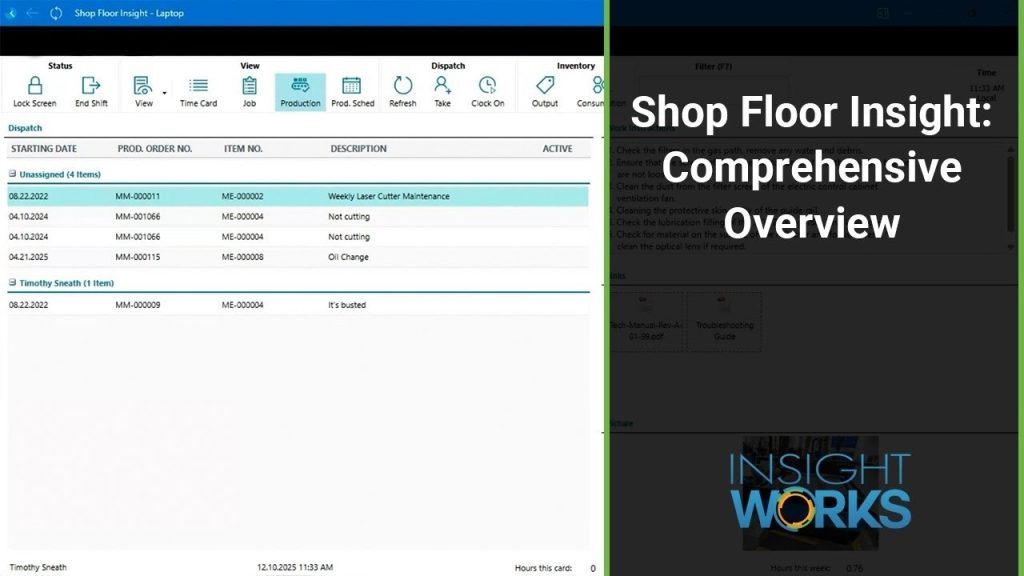
- Dispatch listShow each terminal the work for nearby work centers, and enter time from the list without barcodes.
- Employee sign-inIdentify employees by badge barcode, typed ID, or door access card, with facial recognition on the Windows Time Clock interface.
Production data
- Consumption and outputRecord consumption and output from the floor, with lot and serial numbers and scrap codes.
- Work instructions and documentsShow routing and order comments, elapsed time, and drawing links on the terminal.
- Quality inspectionsRecord inspections from Quality Inspector in a panel on the terminal, including prompts when output is captured.
Time and attendance
Approvals and payroll
- Exception-based approvalsReview time cards in a worksheet that validates on open and highlights problem lines.
- Overtime calculationCalculate daily and weekly overtime as separate adjustment lines that leave the scanned time unchanged.
- Payroll exportExport approved time and attendance to your payroll provider in a configurable file.
Requirements and licensing
Licensed per employee
Every employee who tracks time in Shop Floor Insight needs a Shop Floor Insight license. The number of terminals does not change the Insight Works license.
Business Central licenses for terminals
Each terminal in use at the same time needs a Business Central Device license; alternatively, each employee can use a Team Member license. Team Member users cannot record consumption or output or make scheduling changes.
Business Central licenses for the office
Supervisors and payroll staff who approve and post time work in Business Central and need a Business Central full user or Team Member license.
Cloud or on-premises, with a local service
Shop Floor Insight works with Business Central online and on-premises. In both cases a Windows service on your local network connects the terminals to Business Central, with at least one service per company, time zone, and environment.
Manufacturing or Jobs set up first
Business Central production or Jobs must already be configured and posting correctly. Production orders require the Business Central Premium tier; the Essentials tier is enough when you track time against Jobs.
Terminals
Windows, Android, and Chrome OS devices running Chrome or Edge, with a barcode scanner for scanning stations. iOS, including iPads and Apple computers, is not supported.
Optional modules
The Quality Module and the Graphical Dispatch or Scheduler module are licensed separately, one license per tenant. Quality inspections in the shop floor client come from Quality Inspector.
GET A QUOTE
Your Microsoft Partner prepares a quote for your setup.
App details and prerequisites
- Business Central
- Cloud and on-premises (local Windows service required)
- Insight Works license
- Per employee, subscription
- Business Central license
- Device or Team Member for terminals; user license for office staff
- Devices
- Windows, Android, Chrome OS terminals
- Languages
- English
- Availability
- All countries where Business Central is available
What customers say about Shop Floor Insight
“Shop Floor Insight is the best tool I’ve seen so far. I evaluated other options for my client, but this one stood out for its ease of use and seamless integration with Business Central. Features like the graphical dispatch list, time-tracking tools, barcode-based data capture, and more make it incredibly useful. I highly recommend it.”
Hritika SethMicrosoft Marketplace review “We are a current customer, using Shop Floor Insight and about to use Warehouse Insight and Quality Inspector. I've been very impressed by the tools, the staff, and the company in general.”
Dave StienstraMicrosoft Marketplace review “Shop Floor Insight is an excellent tool for collecting not only Shop Floor data but who completed the work and collect additional information like quality measures. It is very easy to use and with the Knowledge Base and User Forums it makes it great to setup and start using.”
Jenn ClaridgeMicrosoft Marketplace review
Case studies
 Reach Robotics
: Achieving real-time production visibility and traceability with Business Central and Insight Works apps
Reach Robotics, an Australian maker of robotic systems for defense and commercial use, extended Business Central with Enhanced Planning Worksheet, Multi-Level BOM Viewer, Shop Floor Insight, and Routing Analysis, shortening reporting cycles from days to hours.Enhanced Planning Worksheet · Multi-Level BOM Viewer · Routing Analysis · Shop Floor InsightRead the case study → Jim Lawrence Ironworks
: Achieving warehouse accuracy and production visibility with Business Central and Insight Works apps
Jim Lawrence Ironworks, a UK manufacturer of hand-finished interior fittings, extended Business Central with Warehouse Insight, Advanced Inventory Count, License Plating, Shop Floor Insight, Dynamic Ship, and Counter Sales, so tasks that once needed four people now need one.Advanced Inventory Count · Counter Sales · Dynamic Ship · License Plating · Shop Floor Insight · Warehouse InsightRead the case study → Sotech
Transforming bespoke manufacturing with Insight Works’ solutions
Sotech, a UK manufacturer of bespoke engineered metal rain-screen façade systems, moved from Sage Line 50 and spreadsheets to Business Central with Product Configurator, Advanced Inventory Count, Shop Floor Insight, and Warehouse Insight for production, inventory, and shop floor data.Advanced Inventory Count · Product Configurator · Shop Floor Insight · Warehouse InsightRead the case study →
Questions about Shop Floor Insight?
Ready to plan a rollout? Contact your Microsoft Partner. For product questions, send us a note and the Shop Floor Insight team will reply by email. Scoping Shop Floor Insight for a project? Book a Q&A session with the product manager.
Ask a product question
Works alongside Shop Floor Insight
 DocXtenderAttach documents to records by drag and drop, stored in Business Central or SharePoint Online
 License PlatingTrack mixed items on pallets, boxes, and containers with one license plate scan in Warehouse Insight
 Routing AnalysisCompare recorded run times with routing standards and correct routings on the same screen
 Quality InspectorRun configurable inspections in Business Central and grade results to control what each lot can do