

Advanced Inventory Count for Microsoft Dynamics 365 Business Central
Count inventory the way your warehouse works
Finish inventory and cycle counts sooner in Business Central with barcodes and multi-user entry.
Advanced Inventory Count extends inventory and cycle counting in Microsoft Dynamics 365 Business Central with flexible count sheets, multi-user count entry, and barcode integration. Lot and serial number differences reconcile automatically, recount sheets keep an audit trail of every count, and a journal test report flags lines that would fail before you post.
- Cloud and on-premises
- Licensed per company

- Rating on Microsoft Marketplace
- 4.9
- Installs
- 1,000+
Advanced Inventory Count resources
How Advanced Inventory Count helps
Count sheets
Build count sheets around how your team counts
A single journal that lists every item in a location does not match how most teams split up a count. Counters end up working from printouts that do not line up with their aisles, bins, or shelves.
Advanced Inventory Count generates count sheets by bin, shelf, item, or any custom filter, so each counter or team gets the lines they are responsible for. Several people can enter counts at the same time on different sheets, on paper, in Business Central, or with a barcode scanner.
See all Advanced Inventory Count features ↓Reconciliation
Find the real differences before anything posts
Once bins and lot or serial tracking are involved, a count difference can mean missing stock, stock in another bin, or a wrong lot number. Sorting that out line by line takes longer than the count itself.
Advanced Inventory Count works with every Business Central location setup, from no bins to directed put-away and pick, with or without lot and serial tracking. Difference reports roll up counts by item, bin, and lot and show the value of each variance, and lot and serial number discrepancies reconcile automatically, including work in process (WIP).
See all Advanced Inventory Count features ↓Recounts
Send only the questionable lines back for a recount
Recounting a whole location because a few lines look wrong wastes a day. Recounting without a record of the first count leaves auditors with questions.
Set up formal recounts during a full physical count or a cycle count based on a percentage, value, or quantity variance. Advanced Inventory Count keeps an audit trail of the original count quantities and every recount that follows.
See all Advanced Inventory Count features ↓Posting
Post the count once, without retries
A large count journal that fails partway through posting sends someone hunting for the line that caused it. Every retry delays the close of the count.
The Advanced Inventory Count journal test report identifies anything that would prevent posting, such as blocked items, missing item tracking, or missing posting groups. Fix those lines first, then post the journal through standard Business Central posting.
See all Advanced Inventory Count features ↓
Customer story
KONG
KONG, a pet toy manufacturer and distributor in Golden, Colorado, counts with Advanced Inventory Count and Warehouse Insight on handheld mobile computers. A 900-bin count went from 144 person-hours to 12.
Read the case study →
Customer story
Books Council of Wales / Cyngor Llyfrau Cymru
The Books Council of Wales, which distributes Welsh- and English-language books from its Distribution Centre in Aberystwyth, extended Business Central with Warehouse Insight, License Plating, Advanced Inventory Count, Dynamic Ship, and PrintNode Connector PowerTool, halving inventory count downtime.
Read the case study →
Customer story
VIPA Hellas
VIPA Hellas, an Athens-based trader of recovered recyclable materials, extended Business Central with Warehouse Insight, Advanced Inventory Count, Barcode Generator PowerTool, Import Export PowerTool, and PrintNode Connector PowerTool, cutting inventory counts from two to three days to hours.
Read the case study →
Customer story
Jim Lawrence Ironworks
Jim Lawrence Ironworks, a UK manufacturer of hand-finished interior fittings, extended Business Central with Warehouse Insight, Advanced Inventory Count, License Plating, Shop Floor Insight, Dynamic Ship, and Counter Sales, so tasks that once needed four people now need one.
Read the case study →
Customer story
Primal Pet Group
Primal Pet Group, a pet food manufacturer in Abilene, Texas, uses Warehouse Insight, License Plating, Advanced Inventory Count, Order Fulfillment Worksheet, and Dynamic Ship with Business Central to manage raw-material batches, trace lots through production, and support e-commerce fulfillment.
Read the case study →
Customer story
Sotech
Sotech, a UK manufacturer of bespoke engineered metal rain-screen façade systems, moved from Sage Line 50 and spreadsheets to Business Central with Product Configurator, Advanced Inventory Count, Shop Floor Insight, and Warehouse Insight for production, inventory, and shop floor data.
Read the case study →Advanced Inventory Count screenshots
Real screens from Advanced Inventory Count in Business Central, shown with demo data.


Advanced Inventory Count features
11 features in 3 groups. Each one has its own page with screens, steps, and answers to common questions.
Plan the count
- Simplified Count ProcessData entry, reconciliation, posting, and analysis tools for inventory counts and cycle counts in one place.
- Flexible Count Sheet GenerationCreate count sheets that match how your company counts, by bin, shelf, item, or custom filter.
- Supports All Location ConfigurationsWorks with or without bins, with directed put-away and pick, and with lot or serial number tracking.
Enter counts
- Multi-User Count EntrySeveral users enter count data at the same time, regardless of the number of count sheets or staff.
- Inventory Barcode IntegrationCount with barcode scanners through Warehouse Insight or other external data collection systems.
- Counting ScratchpadKeep counting without a network connection using the scratchpad, which is lighter than the Warehouse Insight offline mode.
Reconcile and post
- Reporting and ReconciliationLocate count errors with difference reports by item, bin, and lot, including the value of each variance.
- Lot and Serial ReconciliationReconcile lot and serial number discrepancies automatically instead of entering them by hand.
- WIP CountingIdentify and reconcile WIP with other counted inventory, then post the consumption and inventory adjustment entries.
- Recount SheetsSet up formal recounts by percentage, value, or quantity variance, with an audit trail of every count.
- Journal Test ReportFind blocked items, missing item tracking, and missing posting groups before you post the journal.
Advanced Inventory Count videos
See how Advanced Inventory Count works in Business Central.
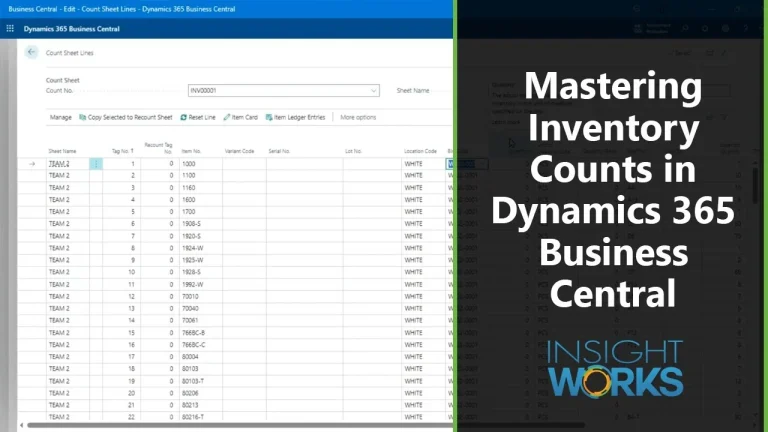
63 min
Run an inventory count from setup to posting in Advanced Inventory Count
For warehouse and inventory managers preparing a full physical count or cycle counts who want to count by scanner or on paper and reconcile before anything posts.
Requirements and licensing
Licensed per company
Advanced Inventory Count needs one license for each company within the tenant. A minimum six-month term applies.
Business Central license
Users need a full user license on the Business Central Essentials or Premium tier.
Cloud or on-premises
Advanced Inventory Count runs on Business Central online and on-premises.
Works on its own or with Warehouse Insight
Advanced Inventory Count runs standalone for counts entered in Business Central. For scanner-based counting, it works with Warehouse Insight, Insight Works' mobile barcode scanning and warehouse management app, or another external data collection system.
Location and bin setups
Works with no locations, optional or mandatory bins, and directed put-away and pick, each with or without lot and serial number tracking.
GET A QUOTE
Your Microsoft Partner prepares a quote for your setup.
App details and prerequisites
- Business Central
- Cloud and on-premises
- Insight Works license
- Per company, subscription
- Business Central license
- Full user license (Essentials or Premium tier)
- Languages
- English
- Availability
- All countries where Business Central is available
What customers say about Advanced Inventory Count
“Advanced Inventory Count is a great solution with many enhancements over Business Central's physical/cycle counting capabilities.”
Anthony DossierMicrosoft Marketplace review “Thanks to the Advanced Inventory Count app, our item tracking and bin management are seamless. A game-changer for large warehouses!”
Microsoft Marketplace review “The Advanced Inventory Count app has transformed our stock-taking. It's efficient, user-friendly, and ensures inventory accuracy. A must-have for Dynamics 365 Business Central users!”
Microsoft Marketplace review
Case studies
 Books Council of Wales / Cyngor Llyfrau Cymru
Books Council of Wales: Building an efficient, accurate and resilient distribution service
The Books Council of Wales, which distributes Welsh- and English-language books from its Distribution Centre in Aberystwyth, extended Business Central with Warehouse Insight, License Plating, Advanced Inventory Count, Dynamic Ship, and PrintNode Connector PowerTool, halving inventory count downtime.Advanced Inventory Count · Dynamic Ship · License Plating · PrintNode Connector PowerTool · Warehouse InsightRead the case study → VIPA Hellas
: Achieving container-level inventory visibility and warehouse accuracy with Business Central and Insight Works
VIPA Hellas, an Athens-based trader of recovered recyclable materials, extended Business Central with Warehouse Insight, Advanced Inventory Count, Barcode Generator PowerTool, Import Export PowerTool, and PrintNode Connector PowerTool, cutting inventory counts from two to three days to hours.Advanced Inventory Count · Barcode Generator PowerTool · Import Export PowerTool · PrintNode Connector PowerTool · Warehouse InsightRead the case study → Jim Lawrence Ironworks
: Achieving warehouse accuracy and production visibility with Business Central and Insight Works apps
Jim Lawrence Ironworks, a UK manufacturer of hand-finished interior fittings, extended Business Central with Warehouse Insight, Advanced Inventory Count, License Plating, Shop Floor Insight, Dynamic Ship, and Counter Sales, so tasks that once needed four people now need one.Advanced Inventory Count · Counter Sales · Dynamic Ship · License Plating · Shop Floor Insight · Warehouse InsightRead the case study →
Questions about Advanced Inventory Count?
Ready to plan a rollout? Contact your Microsoft Partner. For product questions, send us a note and the Advanced Inventory Count team will reply by email. Scoping Advanced Inventory Count for a project? Book a Q&A session with the product manager.
Upcoming webinarBeyond the physical inventory journal: Reliable counts in Business CentralWednesday, November 25, 2026, 11 am to 12 pm CETRegister →Ask a product question
Works alongside Advanced Inventory Count
 Warehouse InsightMobile barcode scanning and warehouse management for Business Central.
 WMS ExpressEntry-level barcode receiving, picking, shipping, and counting on handhelds in Business Central online
 Barcode Generator PowerToolAdd 1D and 2D barcodes to Business Central reports, with sample reports and developer functions
 Item Planning ReviewReview average inventory usage next to item and stockkeeping unit planning parameters, and edit them