
When scanning barcodes in a noisy environment, it can be difficult to hear the notification indicating the scan was successful. To get the maximum audio notification, you can check 2 places for audio settings on the handheld:
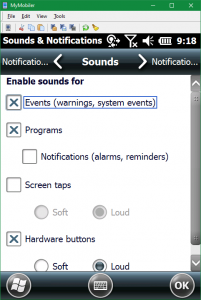
Choose which events you want to hear
- Falcon X3: Start > Settings > Sound & Notification
- Scorpio X4: Start > Settings > Control Panel > Volume & Sounds
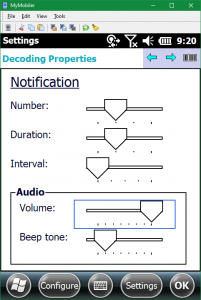
Choose the notification type and volume
- Falcon X3: Start > Settings > System > Decoding > Configure > General > Notification
- Scorpio X4: Start > Settings > Control Panel > Decoding > Configure > General > Notification
Still need help?
Ask other Business Central users in the Insight Works community, or send the details to the support team. Include the steps you took and any error message you saw.