
Module: Ad Hoc Move
Error: The Item Journal Batch does not exist.
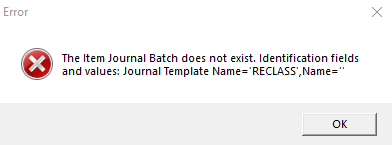
Cause: This is due to a non-specified journal batch for the scanner for Reclass entries.
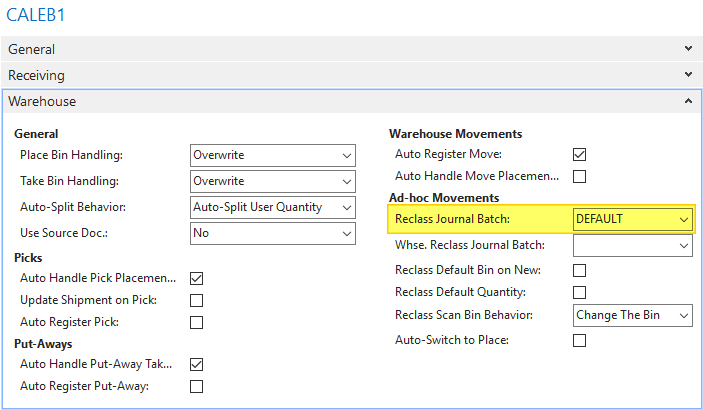
Solution: On the Device Configuration Card (formally called PDA Configuration Card), choose a journal batch to use for Reclass entries (or if the Location is setup to use Directed Pick and Put-Aways, choose a journal batch to use for the Whse Reclass entries).
NOTE: For further configuration options for this setting, and to resolve conflicts when more than one user is performing bin to bin moves at a time, see the KB article entitled “Ad Hoc Move journal options”.
Steps to fix:
1) Navigate to the Device/PDA Configuration Card matching the Device/PDA Code the scanner is using:
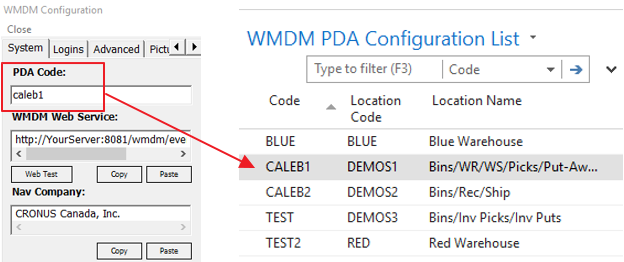
2) On the Warehouse tab, choose a Batch to use for Reclass entries (Note: if the Location is using Directed Picks and Put-Aways, choose a Whse Reclass Batch instead).
3) Confirm the change by clicking the ‘OK’ button in the bottom right of the Device/PDA Configuration Card
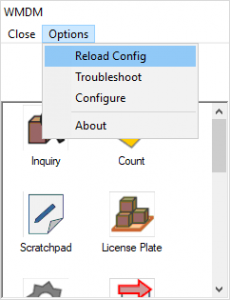
4) On the scanner, perform a ‘Reload Config’. On the main app screen choose OptionsàReload Config:
Still need help?
Ask other Business Central users in the Insight Works community, or send the details to the support team. Include the steps you took and any error message you saw.