
Objective
In some cases, users of Warehouse Insight will want to be able to invoice documents in addition to shipping when posting. This article will walk through the steps and code required to Ship and Invoice a Sales Order.
Requirements
This article requires the following:
- Business Central version 15 or higher
- Warehouse Insight Advanced WMS version 2.0 or higher
Steps
The following steps/code can be modified or extended as required and assume a base level familiarity with Business Central and Warehouse Insight.
- Create the Extension
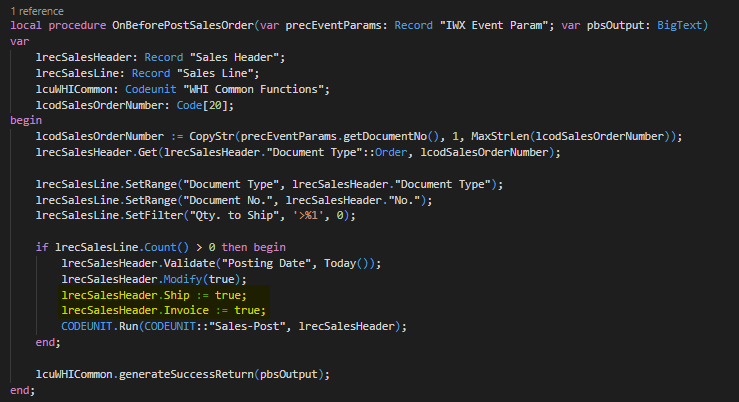
Create an extension codeunit to process the posting and both ship and invoice the document.
In this example, we will override the existing Post event for the Sales Order. Therefore, we will be subscribing to the “OnBeforeProcessEvent” and listening for event ID “70004”.

The code for Posting the Sales Order is given below. When done, we have indicated the event was handled and thus prevent further processing by base Warehouse Insight.
Result
Once the extension codeunit has been published when the Post option is chosen on a Sales Order the document will be both Shipped and Invoiced.
Still need help?
Ask other Business Central users in the Insight Works community, or send the details to the support team. Include the steps you took and any error message you saw.