
USPS has discontinued its First Service in favour of its new service, Ground Advantage. Complete the following to verify and confirm or add the required service:
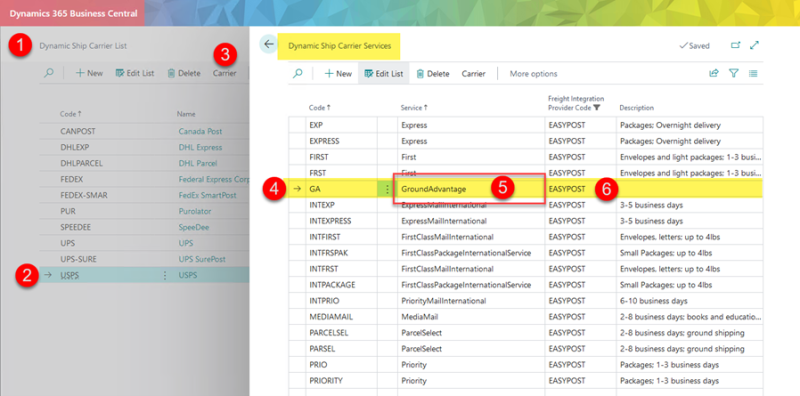
- Navigate to Dynamic Ship Carrier List in Business Central.
- Select USPS to highlight the row.
- Select Carrier / Services to open Dynamic Ship Carrier Services.
- Input new code, max 10 characters, without spaces (e.g., GA, GND, GROUND, GroundAdvantage, or anything you want) in the Code field to represent Ground Advantage.
- Input “GroundAdvantage” in the Service field (EasyPost uses this to get the correct rate).
- Set Freight Integration Provide Code to EasyPost.
- Input a description if needed.
Still need help?
Ask other Business Central users in the Insight Works community, or send the details to the support team. Include the steps you took and any error message you saw.