
Blind shipments will display the ship-to address as the ship-from address on the shipping label instead of your location address.Double blind (a.k.a. drop) shipments will display a selected third party address as the ship-from address. International double blind shipments may require an alternate carrier account that is appropriate for the country.There are three ways to make double blind or drop shipments:
- On an order to order basis
-
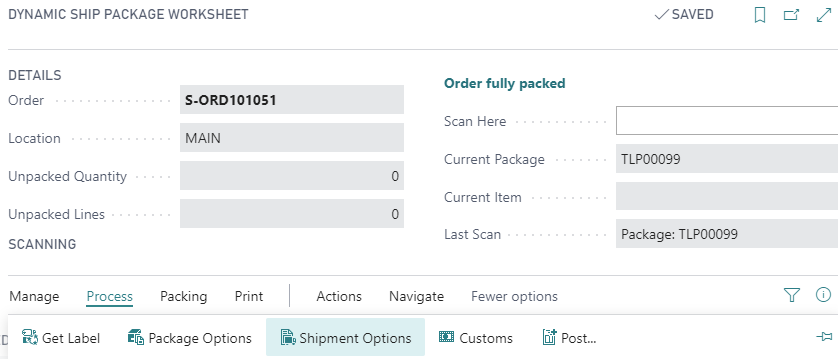
- Open an order in the Package Worksheet
- Start packing the order.
- Open the Shipment Options.
-
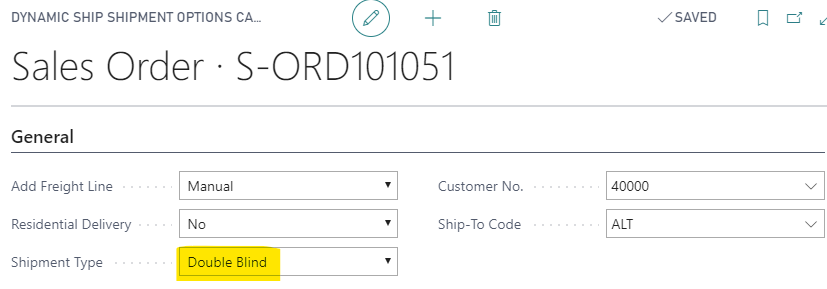
- In the Shipment Options, select the shipment type:
-
- If selecting double blind, fill in the customer number and ship to code as well. For custom, fill in the full return address.
- Automatically via the Customer Options and a Shipment Options Template
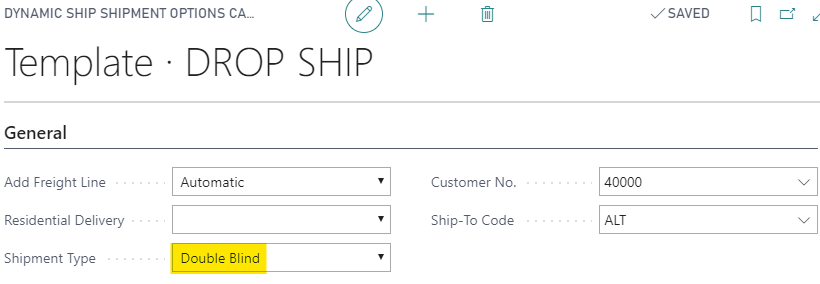
- Open “Shipment Option Templates” from the Dynamic Ship department page.
- Create a new entry.
-
- The Template Code can be used to help identify which customer the template is for.
- Follow the above steps d and e from 1.
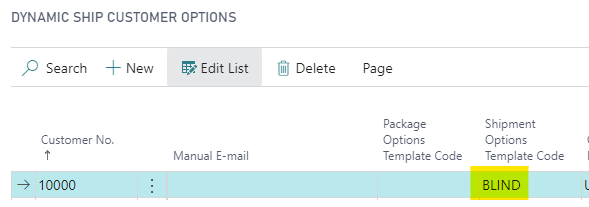
- Open “Customer Options” from the department page.
- Create a new entry for the customer and set the Shipment Options Template Code to the entry that was just created.
-
- Note that entries can be configured per Ship-To Code and/or per Shipping Agent Code. When Use As Default is configured, it will always apply those Customer Options when nothing more specific is found. More details can be found on the Configure Customer Options page.
- When you create a new package in the Package Worksheet, these options will be automatically applied.
- Programmatically
- If these details are already stored elsewhere in Business Central and you do not wish to transition the data to our tables, the process can be automated with code.
- This requires using the Dynamic Ship extensibility.
- Please ask your partner for more details.
When you make a label request, the return address on the label will be replaced with the selected address; however, alternate return addresses only affect undeliverable packages, not return labels.Note that some carriers or services do not allow blind shipping, so the available list of shipping services will be restricted to those that are allowed.
Still need help?
Ask other Business Central users in the Insight Works community, or send the details to the support team. Include the steps you took and any error message you saw.