
Use “Copy Count to Journals” to copy variances to the standard NAV journals:

Set the batch’s that you want to use for the count
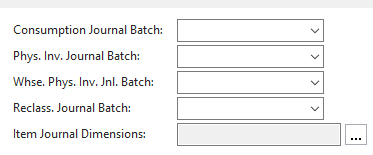
- Physical Inventory Journal: Always used
- Physical Inventory : used id Directed Put-Away is on. (Advanced Warehouse functionality)
- Reclass. Journal: used to adjust item tracking (lot/serial number changes)
Still need help?
Ask other Business Central users in the Insight Works community, or send the details to the support team. Include the steps you took and any error message you saw.