
- This topic has 5 replies, 2 voices, and was last updated 2 years, 8 months ago by Daniel R..
-
AuthorPosts
-
25 February 2024 at 11:17 am #8393DRDaniel R.
I need some help with the dimension on the bitmap that I get back from the Generate128Barcode function. The image is not coming back with the aspect ratio that I am specifying, and the right half of the image is always blank.
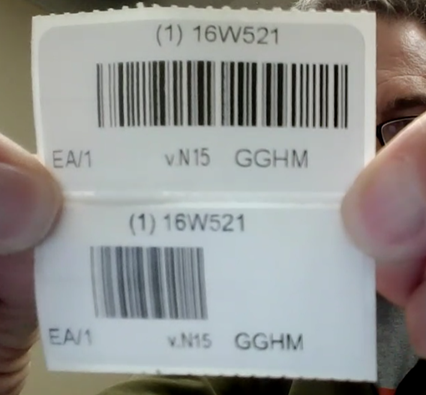
The top one is their old label in NAV, the bottom is the one in BC, using the Insightworks barcode generator. No matter which dimensions I specify, the image only covers half of the control horizontally, and the right hand side of the image is blank. The barcode is correct, it just only shows on the left hand side of the label. I’ve tried a number of different ridiculous dimensions like 1000 x 10 and it does not seem to affect the image that comes back. You’d expect a sliver of a barcode but it covers maybe 50% of the height of the image control. I’ve gotten the height correct, but no matter what I do, it always gives me an image where the right half is just blank and the barcode itself only shows on the left side of the label. I read somewhere that the pixles cover about 150 per inch, but that does not correspond to the actual dimensions of the image.
What we want is to have the barcode span the whole image control, can someone tell me how to accomplish this? I’m sure I am doing something wrong, and I cannot find any documentation on this website.
My variables are barcodeGen: Codeunit “IWX Library – Barcode Gen” and TempBarcode: Record “IWX Barcode” temporary, BarCodeToPrint is a Text50 variable
Code in OnAfterGetRecord: barcodeGen.Generate128Barcode(TempBarcode, BarCodeToPrint, 180, 10);
the column has TempBarcode.Image as its source, and the image control in RDL is set to fit proportionally25 February 2024 at 11:44 am #9745DRDaniel R.Oh one more thing about the image – this is actually showing the image control with ‘fit to size’, to demonstrate that the blank right hand size portion is part of the image. I had observed the blank area with any dimension and of course was surprised to see that extreme dimension ratios (1000×10, 10×1000, did not really affect the returned image. Unless I am misunderstanding the way I’m supposed to call this function, the width/height parameters are not accurate.
The pixel number is supposed to be about 150 pixels per inch. The width/height of the image control is 1.45751 x 0.44792, so I expect that a width of 219 and a height of 67 would give me what I need, but the returned image is not filling the image control, and then I set the control to ‘fit to size’ and I get what you see in the image above
26 February 2024 at 9:54 am #9746TPTravis P.Insight WorksPlease see the demo video of Barcode Generator on the product page for a full walkthrough of the AL and RDL editing process to include barcodes on your report:
https://dmsiworks.com/apps/barcode-generator-powertool
26 February 2024 at 3:02 pm #9748DRDaniel R.I did that and the results are in the image above. My question stands, the generated image seems to ignore the width and height values that I send into the function. The video on your webpage, by the way, shows a QR barcode, my question is about the Generate128Barcode function.
26 February 2024 at 3:42 pm #9749TPTravis P.Insight WorksYou can use the “Sample Barcode List” page to test your data to see how it works without having to edit the report for each attempt. In “List” view you can fill in the text that you want in the barcode and then switch to “Tall Tiles” view to see the resulting barcode.
We just provide general usage info in the forum. For further troubleshooting you will need to email su*****@*******ks.com which will first require signing up as a Business Central partner:
https://dmsiworks.com/non-exclusive-reseller-agreement-application
Microsoft also offers Code128 barcode ability in base Business Central without the need for addon apps:
26 February 2024 at 4:28 pm #9750DRDaniel R.Btw I did check the Sample Barcode List page (that was a helpful suggestion) and can verify that the 128 encoding indeed creates images where the right hand side is blank. The same issue happens with code 39 barcodes, with any width/height I enter.
I’m not expecting any more feedback but I would internally have someone look at this. If it were my app I would really want even my free apps to work right.
-
AuthorPosts
- Sign in below to reply.