
Sales kit for resellers
Dynamic Ship Analysis sales kit
Power BI reporting on Dynamic Ship data: shipping spend by carrier, service level, and location. Everything you need to qualify, demo, and quote it.
The pitch
Dynamic Ship Analysis turns Dynamic Ship shipment data into Power BI reports for Microsoft Dynamics 365 Business Central. This is a completely free app from Insight Works for Business Central. Customers see shipping spend by month, location, carrier, service level, and customer, with year-over-year comparisons and weekly shipment counts.
Who it is for
Business Central online customers who run Dynamic Ship v2.5 or later and want shipping reports in Power BI. It serves the people who plan shipping budgets, staffing, and pickup schedules.
Selling points
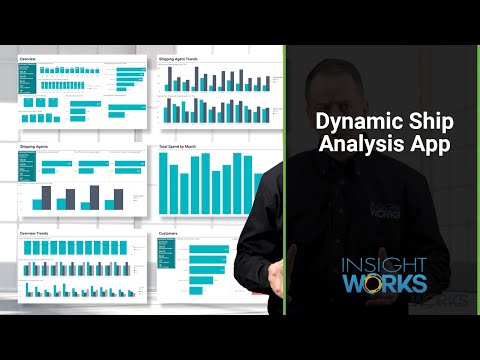
- The whole shipping picture. The overview shows total spend, average spend per shipment, per package, and per pound, and total shipments and packages. Drill down by month, customer, location, and shipping agent.
- Carrier comparison. Total spend, shipment counts, and average spend per shipment for each shipping agent, plus spend by service level and by province or state.
- Trends over time. Shipments against spend over time, shipments by shipment method, and spend by location, with year-over-year comparisons and average shipments per week.
- Requires Dynamic Ship. Dynamic Ship Analysis reports on Dynamic Ship data and does not work on its own. It needs Dynamic Ship v2.5 or later, licensed separately per physical shipping location.
- No Insight Works license. Runs on Business Central online. The Power BI report runs under the signed-in user's own license, not a Business Central license.
- Two-part installation. Install the Business Central extension that supplies the report data, then the Power BI app from Microsoft Marketplace. Connect both to the same Business Central environment.
Customer not on Dynamic Ship yet?
Dynamic Ship Analysis needs Dynamic Ship, Insight Works' shipping app for Business Central, licensed separately per physical shipping location.
See Dynamic Ship →Qualify the opportunity
Fit-gap questions to ask before a demo. The answers tell you whether Dynamic Ship Analysis fits, and what to show.
- Are you using Microsoft Dynamics 365 Business Central online with Dynamic Ship today? Which version of Dynamic Ship?
- How do you analyze shipping data today, such as spend by carrier? Is it manual or automated?
- Do you track shipping spend by month or by location? Would those numbers help your decisions?
- Can you see shipping spend by carrier, service level, or province or state?
- How do you compare shipping volume and cost year over year today?
- Do you know your average shipments per week? Would it help with staffing and pickup schedules?
- Do you use Power BI for reporting today?
- Are you looking for ways to use your own shipment data to control shipping costs?
- Who in your company reviews shipping costs, and how often?
Demo and proof
On-demand demo
Licensing at a glance
- Business Central
- Online (cloud)
- Insight Works license
- None required
- Platform
- Microsoft Power BI
- Required app
- Dynamic Ship v2.5 or later
- Languages
- English
- Availability
- All countries where Business Central is available
Files
Battle card
Two pages for your sales team: what the app adds to Business Central, selling points, qualifying questions, and answers to common questions.
Download (opens in a new tab)Datasheet
For prospects: the same datasheet as the public app page.
Download (opens in a new tab)Dynamic Ship Analysis logo
PNG, SVG, EPS, and AI files.
Download
Help with a Dynamic Ship Analysis opportunity

Melonie Wood
Partner Success, North America and global
Pre-sales meetings, pricing questions, implementation guidance, and connecting you with the right technical people.
Message Melonie →
Erik Garstad
Product Consultant
Pre-sales meetings, pricing questions, implementation guidance, and onboarding for European partners.
Message Erik →
Brian Neufeld
Marketing
Co-marketing, your reseller listing, webinars, and content for your campaigns.
Message Brian →
- Book a product manager Q&A sessionFor a qualified opportunity with detailed questions
- Back to the partner hubPricing, other apps, marketing, and support