Insight Works
 
Newsletter for Authorized Partners
September 2025
 
In this Edition

App Upgrades
 
DocXtender v2.4
A free app that enables users to attach documents to any Business Central record with a simple drag and drop.
New features in DocXtender v2.4 include:
  • See SharePoint Links Immediately: Links attached to a record after uploading to SharePoint now appear instantly without a page refresh, so you confirm uploads faster and move on without losing context.
  • Upload to SharePoint from the Links FactBox: A new action in the Document Attachment List FactBox uploads existing attachments to SharePoint in one step, keeping documents centralized and reducing clicks.
  • Faster Logins to SharePoint: Speed up dragging and dropping to SharePoint with faster login logic that also minimizes authentication prompts so you complete uploads with fewer interruptions.
  • Automatically Replace Duplicate Attachments: When a duplicate file is detected, you can replace the existing document attachment, keeping records clean and avoiding multiple versions of the same file.
  • Easily Add Drag & Drop to Standard Tables: Improved logic handles most standard tables, even if their pages do not have document factboxes, reducing the effort to extend the pages.
 
VIEW DOCXTENDER APP   VIEW RELEASE NOTES   VIEW DEMO VIDEO
 
Order Fulfillment Worksheet v1.5
Optimize your order fulfillment process by focusing on in-stock orders.
Order Fulfillment Worksheet’s new features include:
  • Smarter Order Line Visibility: Get a better understanding of all allocations in one view with the Order Lines page, now with all filters and views applied.
  • Enhanced Availability Calculations: Allocations now include internal movements, assembly, and production orders, giving a complete picture of what’s ready to ship.
  • Faster Processing for Large Volumes: Customers handling high order volumes benefit from improved load and calculation speeds when opening or recalculating the worksheet.
  • Flexible Partial Shipments: Allow creation of partial Warehouse Shipments for partial sales line quantities to better reflect how product is fulfilled.
  • Accurate Partial Shipment Availability: Availability calculations include the partial shipments functionality, ensuring better planning.
  • Simple View Reset: Use the new Clear View action to quickly remove custom views and return to a clean worksheet view.
  • Efficient Refresh Process: The worksheet refreshes only once per action, reducing unnecessary system load and improving responsiveness.
 
VIEW ORDER FULFILLMENT WORKSHEET APP   VIEW RELEASE NOTES   VIEW DEMO VIDEO
More Recent App Upgrades
App Release Notes Demo Website
License Plating v1.97 Notes Demo Website
Maintenance Manager v.14 Notes Demo Website
MxAPS v4.9 Notes Demo Website
Shop Floor Insight v7.14 Notes Demo Website
Quality Inspector v7.22 Notes Demo Website

New! App Release Tracker Now Live
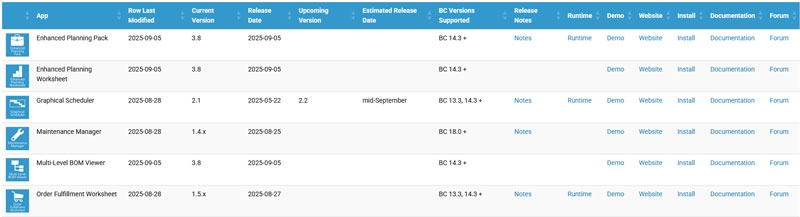
App Release Tracker Table
 
Stay on top of every Insight Works app update with our new App Release Tracker — your go-to hub for the latest release dates, version numbers, and AppSource availability.
 
  • Always up to date
  • All apps in one place
  • Fast version checks
 
Whether you're supporting clients or planning upgrades, this tool saves time, reduces guesswork, and keeps you informed.
 
VIEW THE APP RELEASE TRACKER NOW

Have an idea? Explore Feature Requests
 
We've made it easier than ever to share your input with the Insight Works Feature Requests page. Suggest new features, vote on others' ideas, and help shape the future of our apps.
 
  • Submit your own requests
  • Vote on what matters most
  • Be part of the conversation
 
We're listening — and your feedback drives what's next.
 
SUBMIT YOUR FEATURE REQUEST HERE

Discover Insight Works’ Project Map
Insight Works Project Map
 
The Project Map is your structured guide for implementing Insight Works apps in Microsoft Dynamics 365 Business Central. It keeps projects on track by clarifying responsibilities and ensuring all prerequisites are in place before training starts.
What it includes:
  • Step-by-step prerequisites for each Insight Works app
  • Defined responsibilities for Partners, Clients, and Insight Works
  • Individual checklists for specific apps
Why it matters:
  • Prevents delays caused by incomplete setup or missing data
  • Serves as both a readiness checklist and a responsibility matrix
  • Ensures efficient use of training and consulting time
  • Surfaces risks (e.g., missing test data, extra connector requirements) early
  • Provides a baseline project plan for every engagement
Use the Project Map to align expectations, save time, and move smoothly into training and deployment.
 
VIEW PROJECT MAP

Upcoming Conference
Community Summit North America 2025
October 19-23, Orlando, Florida, United States
 
Insight Works is excited to be part of Community Summit North America 2025, the leading event for Microsoft Business Applications users. Join us in Orlando for deep learning, powerful networking, and practical strategies to get more from Dynamics 365 and the Power Platform.
 
Stop by booth 721 to connect with our team and see how Insight Works can help you do more with Business Central.
 
Mark
Mark
Marcel
Marcel
Brian
Brian
Laurie
Laurie
Nathan
Nathan
 
Insight Works Sessions:
  • Ask the Experts Manufacturing
  • Barcode Integration in Business Central to Streamline Operations
  • Get More from Business Central with Free Apps
 
Bonus: Use promo code InsightWor10 for 10% off your registration.
 
READ PRESS RELEASE   LEARN MORE

Upcoming Webinars
 
Transforming Quality Inspections in Business Central: From Paper to Automation
September 17, 2025, 11:00 am CET (Europe)
 
This webinar will talk about how to replace paper checklists and disconnected quality processes with real-time, automated inspections in Business Central. Learn how to trigger tests during receiving or production, capture results on mobile devices, and take instant action using Power Platform and Teams.
 
REGISTER HERE
 
Manage Equipment Maintenance in Business Central: Plan Smarter, Prevent Downtime
September 24, 2025, 1:00 PM EDT (North America)
 
Join this upcoming session to learn how to manage maintenance workflows, automate preventive schedules, and track assets—all within Dynamics 365 Business Central. Streamline operations, reduce downtime, and give your team mobile access to the tools they need to keep equipment running smoothly.
 
REGISTER HERE
 
 
Optimize Counter Sales Workflows in Business Central
October 15, 2025, 1:00 PM EDT (North America)
 
Join this upcoming session to see how Counter Sales for Dynamics 365 Business Central simplifies front-counter workflows. Learn how to speed up order entry, accept flexible payments, and give staff instant access to pricing, availability, and customer data—all without leaving Business Central. Perfect for trade desks, parts counters, and retail environments looking to move fast and stay accurate.
 
REGISTER HERE
 

Discover Insight Works University on YouTube!
 
Warehouse Insight Configuration Essentials (C14): Explore the various Warehouse Insight configuration concepts that make the solution more efficient and usable, but that are often misunderstood or overlooked during implementations.
 
VIEW FEATURED VIDEO   VIEW PLAYLIST

Hardware: Connected Speed for Warehouse Insight
 
Datalogic Memor 17 – 5G Mobility in a Slim, Rugged Design
 
Datalogic Memor 30 handheld scanner The Memor 17 is ideal for warehouse teams who need fast, accurate scanning and real-time connectivity across the floor and beyond. With a 6” glove-friendly touchscreen, Green Spot feedback, and hot-swappable power, it keeps work moving without interruptions.
  • Stay connected – 5G and Wi-Fi 6E keep WMS data flowing inside and outside the building
  • Scan with confidence – Green Spot confirms every read, even on damaged or faded labels
  • Built to handle it – IP65/IP67 sealed, MIL-STD-810H rated, Gorilla® Glass 7 screen
  • Power through shifts – Hot-swappable 4,000 mAh battery and Qi wireless charging
  • Ready for enterprise – Android™ 13 with long-term OS support and security tools

If your warehouse team needs speed, mobility, and rugged reliability, the Memor 17 delivers.

 
SHOP ONLINE

Recent Webcasts
 
  • Solving Warehouse Chaos in Business Central with Mobile Barcoding: View Webcast
  • Inventory Counts in Business Central: Common Pitfalls and How to Overcome Them: View Webcast
  • Modernizing Quality Inspections in Business Central: From Paper to Automation: View Webcast
 
WATCH ALL WEBCASTS

Recent Blog Articles
 
  • Shipping with Business Central Is More Than Printing a Label: View Blog Article
  • Eliminate Manual Errors in Business Central with Barcode-Driven WMS: View Blog Article
  • How to Improve Product Quality Using Business Central (Let Power BI and Excel Show You): View Blog Article
  • Simplifying Compliance Through Quality Control in Business Central: View Blog Article
  • From Quote to Shipment: Will the Sales Order Agent and Order Ship Express Replace You?: View Blog Article
  • Smarter BOMs in Business Central: Beyond the Structure Page: View Blog Article
  • What’s New in Business Central’s DocXtender v2.4?: View Blog Article
  • The Hidden Bottleneck in Your Business Central Production Plan: View Blog Article
  • Streamline EHS Compliance in Business Central with Safety Logbook: View Blog Article
  • From Chaos to Compliance: 5 Safety Mistakes You Can Solve in Business Central: View Blog Article
  • What’s New in Business Central’s Order Fulfillment Worksheet v1.5?: View Blog Article
  • How Manufacturers Automate Preventive Maintenance with Business Central: View Blog Article
  • The Best Way to Handle Corrective vs. Preventive Maintenance in Business Central: View Blog Article
 
VIEW ALL BLOG ARTICLES

Inside Insights Podcast Recent Episodes
 
  • Eliminating Counter Sales Chaos in Business Central with Guided Workflows: View Podcast
  • Replace Manual Scheduling with Automation in Business Central Manufacturing: View Podcast
  • Free Apps for Business Central That Fix Everyday Workflow Friction: View Podcast
  • Automating Sales Orders and Shipping in Business Central Without Replacing Your Job: View Podcast
 
LISTEN TO ALL PODCASTS

Recent Press Releases
 
  • Three New Free Apps for Business Central: Forecasting, Planning & Safety Logging: View Press Release
  • Seven Resellers Join Insight Works to Strengthen Business Central Support: View Press Release
  • Quality Inspector App Turns Quality Control into a Competitive Advantage for Business Central Users: View Press Release
  • Business Central App Upgrade: New Features in DocXtender v2.4: View Press Release
  • Simplify Workplace Safety and Compliance in Business Central with Safety Logbook: View Press Release
  • Business Central App Upgrade: New Features in Order Fulfillment Worksheet v1.5: View Press Release
  • Redefine Equipment Maintenance in Business Central with Maintenance Manager: View Press Release
 
VIEW ALL PRESS RELEASES


Insight Works
Corporate Office
Suite #102, 5661 99 Street NW
Edmonton, Alberta, Canada T6E 3N8

European Office
Kingsfordweg 151
1043 GR Amsterdam, The Netherlands
Insight Works 2024, All rights reserved.