Insight Works
 
Newsletter for Authorized Partners
July 2025
 
In this Edition

App Upgrades
 
Shop Floor Insight v7.14
A comprehensive MES solution for barcoded time capture and employee time management.
Shop Floor Insight, seamlessly integrated with Microsoft Dynamics 365 Business Central, empowers manufacturers and distributors to track time, manage production, and improve shop floor visibility. New features in Shop Floor Insight v7.14 include:
  • Boost Productivity with Faster Data Performance: Optimized SQL queries ensure lightning-fast responsiveness, so your team spends less time waiting and more time making progress.
  • Clearer Error Reporting Saves Time: Business Central endpoint errors now display directly within the interface, giving users immediate visibility and simplifying troubleshooting.
  • Easier Installation with Guided Setup: Enhanced welcome instructions in the Shop Floor Insight installer streamline onboarding, making it easier to get started—no head-scratching required.
  • Effortless Client Launching: Fully Qualified Domain Name (FQDN) links in the installer allow users to launch clients quickly and accurately, improving connectivity and reducing confusion.
  • Simplified Authentication Setup: Streamlined authentication configuration within the installer ensures a smoother connection to Business Central.
  • Quicker Credential Access: New buttons provide instant links to Credential Manager, simplifying credential management and speeding up the setup process.
  • Improved Service Order Integration: Time Card Lines automatically update if a user deletes the associated Service Line, saving time and ensuring data accuracy.
  • Consistent Terminology Improves User Experience: We’ve updated “Jobs” to “Projects” throughout the app, aligning with the latest Business Central terminology and reducing confusion.
  • Streamlined Installer Access: A new download link in the Shop Floor Setup Wizard keeps users up to date with the latest installer version—no more hunting for updates.
 
VIEW SHOP FLOOR INSIGHT APP   VIEW RELEASE NOTES   VIEW DEMO VIDEO
 
DocXtender v2.3
A free app that enables users to attach documents to any Business Central record with a simple drag and drop.
The free DocXtender app, seamlessly integrated with Microsoft Dynamics 365 Business Central, enables users to drag and drop documents—such as invoices, purchase orders, emails, and more—directly onto Business Central records. With DocXtender, files stay organized, accessible, and connected to your workflows. New features in DocXtender v2.3 include:
  • Duplicate File Management: Automatically replace or rename files in SharePoint when duplicates are uploaded via non-interactive logins, ensuring your document versions stay clean and controlled.
  • Multi-Language Folders: Say goodbye to cryptic folder names! SharePoint folder names now support table captions instead of table names—making navigation intuitive, regardless of your team’s language.
  • Expanded Integration Options: Connect external apps to DocXtender like never before. New integration events and exposed procedures let you specify file parameters, override folder structures, and programmatically save documents—unlocking seamless integration with your broader ecosystem.
 
VIEW DOCXTENDER APP   VIEW RELEASE NOTES   VIEW DEMO VIDEO
 
MxAPS v4.9 Update 3
Drive Manufacturing Excellence with Advanced Finite Capacity Scheduling in Business Central.
The latest MxAPS app update enhances the handling of Production Order Components during schedule commits, introducing new settings and clearer post-commit summaries. Version 4.9 Update 3 also includes UI consistency improvements, updated abbreviations, and a new integration event to support customizations.
 
VIEW MxAPS APP   VIEW RELEASE NOTES   VIEW DEMO VIDEO
 
WMS Express v2.14
Improve warehouse accuracy and boost efficiency with mobile device and barcode integration.
The latest WMS Express app upgrade introduces automatic package ID generation, enhanced barcode parsing (including GS1 support), and packages-as-containers for improved shipment tracking. Version 2.14 also offers faster performance, per-device feature control, and a more streamlined experience—seamlessly integrated with Business Central and still available at no cost.
 
VIEW WMS EXPRESS APP   VIEW DATASHEET   VIEW DEMO VIDEO

Upcoming Webinars
 
Real-World Forecasting and Planning in Business Central
July 16, 2025, 11:00 am CET (Europe)
 
Upgrade your planning in Business Central with the free Enhanced Forecasting Worksheet and free Enhanced Planning Worksheet apps. This webinar shows how to replace spreadsheets with AI-driven forecasts, real-time supply visibility, and innovative purchasing tools—all within the interface you already know.
 
REGISTER HERE
 
Inventory Counts in Business Central: Common Pitfalls and How to Overcome Them
July 30, 2025, 1:00 pm EDT (North America)
 
This upcoming webinar will demonstrate to Business Central users how to avoid common inventory counting issues, such as manual errors, messy spreadsheets, and slow processes. Learn how to speed up counts with smart sheet generation, barcode scanning, multi-user entry, and tools to handle everything from simple stockrooms to advanced warehouse setups.
 
REGISTER HERE

Discover Insight Works University on YouTube!
 
Extending Graphical Scheduler (D08): Unlock the full potential of Graphical Scheduler by learning to configure and extend its capabilities. This session will teach you how to use existing data source types and implement custom data source handlers to tailor how data is displayed.
 
VIEW FEATURED VIDEO   VIEW PLAYLIST

Hardware
 
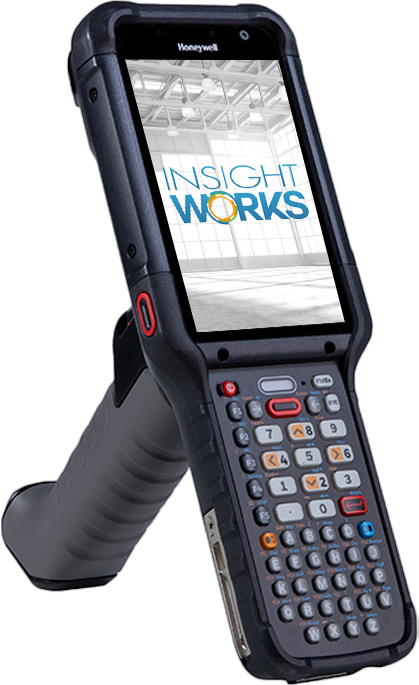
Introducing the Honeywell CK67 Mobile Computer for Warehouse Insight
 
Built for the toughest warehouse and distribution center environments, the Honeywell CK67 combines ultra-rugged durability with powerful, future-ready tech—at a lower price than the CK65. Powered by the Qualcomm 4490 and Honeywell’s Mobility Edge™ platform, it delivers long-term Android support (14–18) and fast, reliable connectivity to keep your operations moving.
  • Ultra-Rugged: Withstands 8-foot drops, 4,000 tumbles; IP65/IP68 rated
  • Superior Scanning: FlexRange™ XLR reads barcodes from 3 inches to 80 feet
  • Modern Performance: Octa-core processor, 8GB RAM, 128GB storage
  • Next-Gen Connectivity: 5G, Wi-Fi 6E, CBRS-ready
  • Worker-Friendly: Ergonomic design, responsive keypad, hot-swappable battery
Already using the CK65? The CK67 is the smarter upgrade—offering more power, improved ergonomics, and a lower total cost.
SHOP ONLINE   CK65 vs. CK67 – What’s the Difference?

Recent Webcasts
 
  • Beyond the Basics: Smarter Forecasting and Planning in Business Central: View Webcast
  • Optimise Production Scheduling with Graphical Scheduler for Business Central: View Webcast
  • Solving Warehouse Chaos in Business Central with Mobile Barcoding: View Webcast
 
WATCH ALL WEBCASTS

Recent Blog Articles
 
  • How to Optimize Production Schedules in Business Central with a Single Click: View Blog Article
  • Document Drag-and-Drop Upgrade for Dynamics 365 Business Central: Blog Article
  • MES Upgrade for Business Central: Insight Works Version 7.14: View Blog Article
  • How to Identify Poor-Performing SKUs in Business Central and Make Smarter Inventory Decisions: View Blog Article
  • Warehouse Management for Business Central—Without Breaking the Bank: View Blog Article
 
VIEW ALL BLOG ARTICLES

Inside Insights Podcast Recent Episodes
 
  • Cracking the Code on Warehouse Inefficiencies: Real-Time Solutions for Business Central Users: View Podcast
  • How DocXtender Streamlines Document Management in Dynamics 365 Business Central: View Podcast
  • Shop Floor Insight MES v7.14: Efficiency and Usability Improvements for Business Central: View Podcast
  • Breaking the Barcode Barrier: WMS Express in Business Central: View Podcast
 
LISTEN TO ALL PODCASTS

Recent Press Releases
 
  • Insight Works Updates Free DocXtender App for Business Central, Adds New Features: View Press Release
  • Shop Floor Insight v7.14: The Latest MES Upgrade for Dynamics 365 Business Central: View Press Release
  • Insight Works Onboards Seven New Resellers to Strengthen Business Central Solutions: View Press Release
 
VIEW ALL PRESS RELEASES


Insight Works
Corporate Office
Suite #102, 5661 99 Street NW
Edmonton, Alberta, Canada T6E 3N8

European Office
Kingsfordweg 151
1043 GR Amsterdam, The Netherlands
Insight Works 2024, All rights reserved.