|
|
 |
|
| Leaders in Apps for Manufacturing & Distribution |
|
|
|
| August 2022 |
|
| News for Insight Works Partners |
|
|
|
|
In this edition:
|
|
|
Product Update: Warehouse Insight V2.8 now on AppSource
The Warehouse Insight app for Business Central provides employees with full access to Dynamics 365 Business Central via barcode scanners and hand-held computers. It streamlines inventory and warehouse functionality to provide intuitive warehousing tools for inventory counts, shipping, receiving, picks, putaways, bin management, and more. Version 2.8 is now available on AppSource and includes several performance enhancing additions.
- Improved caching and performance. Enabling caching on the Device Configuration card will improve handheld performance significantly.
- Additional authentication options. Warehouse Insight now supports WSAK, interactive OAuth, Service to Service, and User Impersonation.
- Production output application now supports run time and setup time entry.
- Changes to accommodate performance limitations with OData.
|
|
|
Webinar: Supercharge Business Central with the Enhanced Planning Pack App
Wednesday, August 10, 2022
Register: https://register.gotowebinar.com/rt/1510266505973691918
For anyone using Dynamics 365 Business Central who wants increased visibility into forecasts and operations, this is one webinar you won't want to miss. Join us as we introduce you to the Enhanced Planning Pack app from Insight Works.
The Enhanced Planning Pack for manufacturing and distribution is comprised of five utilities to help determine required stock levels, streamline processes, and get more from Business Central.
What you will learn:
- Alternate Material Resource Planning (MRP) logic for distributors struggling with standard Business Central MRP.
- Methods to manage inventory levels based on historical trends to fine-tune reorder levels while preventing stock-outs.
- How to Generate more realistic Business Central production forecasts based on historical item usage trends.
- Strategies to streamline your Bill of Material (BOM) management and engineering operations.
- Ways to improve costing, sales margins, and scheduling by analyzing actual production times compared to planned production times.
End-users, consultants, VARs, and others are encouraged to attend this webinar. Can't make it? Register anyway, and you'll receive a link to the recording.
|
|
|
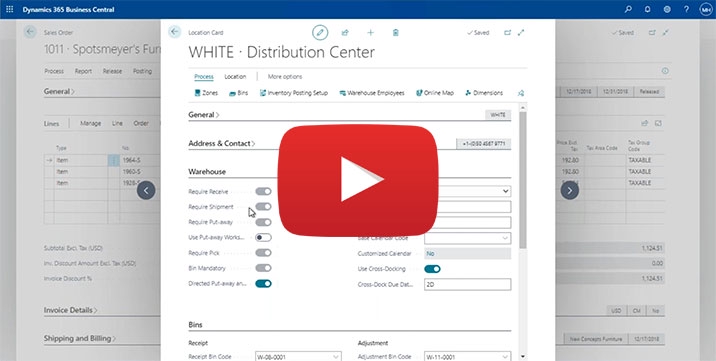
Webcast: Configuring and Using Warehousing in Business Central
Business Central isn�t a one-size-fits-all solution. Instead, Business Central provides numerous configuration options to enable warehouses and supply chains to manage their specific processes.
What is Business Central capable of when it comes to warehouse configurations? Watch this video, and we will provide an overview of warehouse configuration options and approaches in Business Central.
Learning objectives:
- Understand how to decide which configuration and documents make sense for you.
- Understand basic functionality, including inventory put-aways, picks, & movements.
- Delve into advanced features, including warehouse receipts, various worksheets, bins, and the warehouse item reclassification journal.
- Understand the different classes of warehouse configuration.
- Learn how the Location configuration options impact Warehouse Documents.
- Learn how to use various Warehouse Documents, such as Warehouse Shipments, Picks, and Movements.
|
|
|
Article: How to Choose a Mobile Computer to use with Business Central
Choosing a mobile computer for your customer's projects can be daunting. With so many options on the market, it's hard to know where to start. The most important thing to remember is your customer's needs. What are they looking for in a mobile computer? Do they need something lightweight, or are they looking for something durable to handle heavy use? Once you know their needs, you can start narrowing down your options. We have a guide to help you understand how to choose a mobile device. Once you read the article, you'll have the knowledge to properly advise your customers.
|
|
|
Online Knowledge Base, Community Forums and FAQYour Source for Learning and Support
Are you looking for 24/7/365 support? Look no further than the Insight Works' Knowledge Base. The knowledge base is a great place to start when looking for help. Search for content or check out the popular content.
|
Also available are the Community Forums. These forums are where you can ask questions or review solutions to questions asked by others. Insight Works' technical support pros monitor the forum.
|
Finally, you'll find a "Frequently Asked Questions" section where you can get some great information on licensing, support, and other popular topics.
|
|
|
On-Demand Product Demos
Our on-demand product demos are a great place to start for prospects who are looking for an in-depth look at a specific app from Insight Works:





|
|
|
Free Apps for Business Central Cloud
One big reason Insight Works offers free apps is to help partners sell Business Central to end-users. With free apps from Insight Works, partners can add more value to their solutions providing end-users with some practical functionality they wouldn't normally get with Business Central.




|
|
Stay Up-to-Date and Follow Us
|
|
|
|
|
Insight Works
Suite #102, 5661-99 Street NW, Edmonton, Alberta, Canada T6E 3N8
www.dmsiworks.com |
|
| © 2022 Insight Works All Rights Reserved |
|
|
|
|
|