
Shop Floor Insight has supported configurable CSV exports to popular Payroll Systems such as ADP, Ceridian, Serenic and countless others. These exports are often tweaked to meet site-specific requirements or custom formats. Common ADP integration customizations include supporting sequence numbers, batch formats, and dealing with extended columns that can be configured per ADP site. To address this and improve implementation speed we’ve introduced a configurable ADP export system that can also be used with other CSV exports. The new codeunit is 23044129.
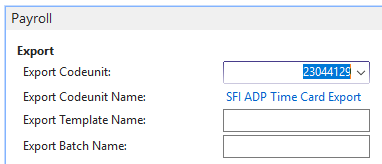
Once configured, a new “Configure ADP Export” action will become enabled.
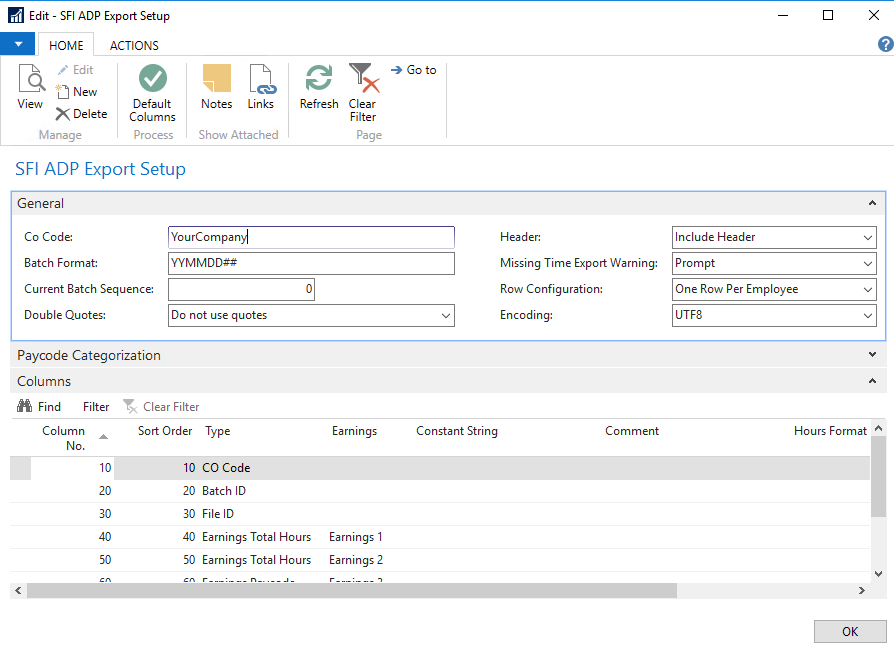
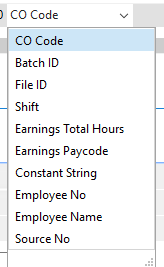
The batch format provides individual sequencing when used with either #, ##, or ###. The sequence number itself is also tracked per export with the “Current Batch Sequence” field. Multiple paycodes can be combined into single columns for increased flexibility. The ADP CO Code, Batch ID, File ID ( the three fixed columns in ADP time files) can all be chosen and configured as well as total hours, paycodes, other fixed strings, an employee lookup, source lookup, and/or the employee name.
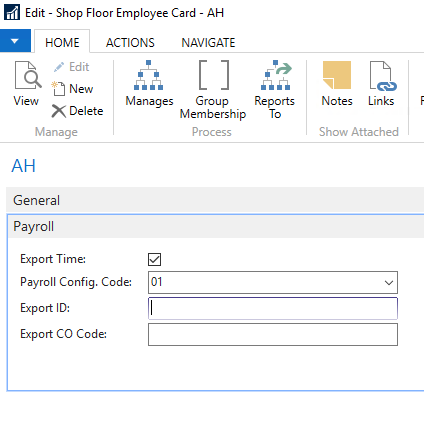
The CO code can be defined globally with the “CO Code”, as well as having an override option for individual employees. Likewise the ADP File ID (employee reference) no longer needs to match the Shop Floor Employee No. If an “Export ID” is supplied then that will be used instead of the “No.” field, and if left empty it will continue to use the “No.” field from the Shop Floor Employee.
Still need help?
Ask other Business Central users in the Insight Works community, or send the details to the support team. Include the steps you took and any error message you saw.