
Pass conditions are effectively Business Central filters.
When you are in a scenario where the pass condition contains special characters that have meaning to Business Central filters (such as <,>,|,&) then they need to be escaped.
This article will go through a common scenario of using “Less Than” Values as Quality Inspection Field Choices. This scenario can occur in a lab result, when the lab result is reported as a category such as <10, <20, or <30. Effectively, this is when the reported result is a threshold category rather than a precise numeric measurement.
This configuration can be useful when a laboratory reports results as predefined categories rather than an exact measurement.
Some common industry examples could be:
- Microbiology counts:
<10 CFU/g,<100 CFU/mL, etc., when the organism count is below the method’s reporting or detection threshold. - Chemical contaminant testing:
<10 ppb,<20 ppm, etc., for pesticides, heavy metals, cleaning residues, or other analytes below a reporting limit. - Allergen testing: results such as
<2.5 ppm,<5 ppm, or<10 ppmwhere the lab reports that the allergen is below a quantifiable level. - Environmental/water testing:
<0.10 µg/L,<1 mg/L, etc., for contaminants that were not detected above the method’s detection limit. EPA laboratory guidance explicitly uses results such as<0.10 µg/Lto represent non-detects. - Sanitation or hygiene testing: predefined microbial or residue bands where the actual output is reported as “less than X” rather than an exact value.
Configuration Example
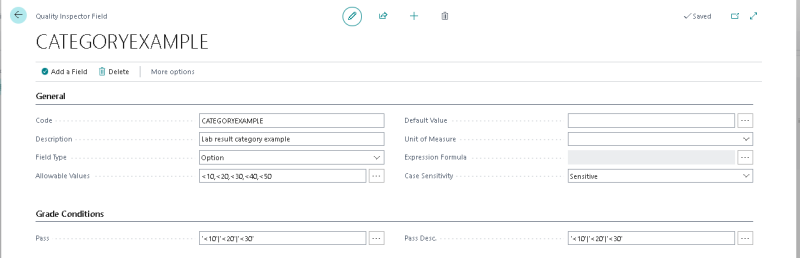
In this example we’ll presume that the allowed choices should display as <10, <20, <30, <40 and <50, however it will only be considered a pass if either <10 or <20 or <30 is chosen.
- In Business Central, search for and open Quality Inspector Fields.
- Create a new Quality Inspector Field.
- Set Field Type to Option. Quality Inspector supports option/choice fields for a finite list of possible results.
Enter the possible results in Allowable Values, separated by commas:
<10,<20,<30,<40,<50Configure the Pass condition using single quotes around each literal value and
|between acceptable results:'<10'|'<20'|'<30'Important: Quotes are used because “<” has meaning to Business Central in the context of a filter string.
Related articles
- Quality Inspection Fields – Configure fields, field types, allowable values, and default passing conditions.
- Configure Grades – Learn how Pass, Fail, and other grade conditions are evaluated.
- Create Quality Inspections for Receipts – Example of configuring Quality Inspector fields and pass conditions for receiving inspections.
Still need help?
Ask other Business Central users in the Insight Works community, or send the details to the support team. Include the steps you took and any error message you saw.