
A food manufacturer receives flour from a supplier that has delivered consistently good quality for years.
There is no regulatory requirement in this example for formal skip-lot rules, and incoming flour is already covered by supplier audits and certificates of analysis (COAs).
To reduce workload while still maintaining periodic verification, the QC team wants to setup a simple scenario of only testing every 4 lots that are received.
Because there are only 2 steps the failure is irrelevant in this simplified process, however this might trigger a human to decide to re-test or test other recent lots received.
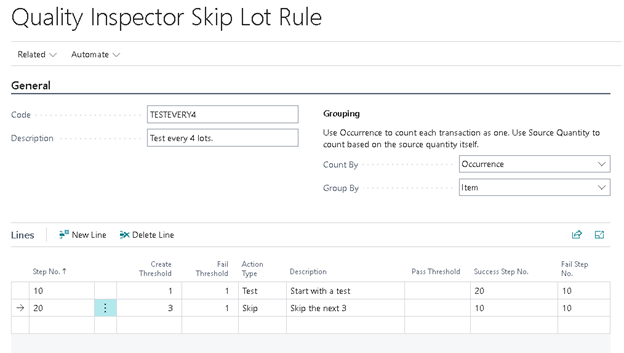
To implement this in Quality Inspector you would create a skip lot rule configuration with two lines, the first being a test with a create threshold of 1, and the second being a skip with a threshold of 3.
| Step No. | Create Threshold | Fail Threshold | Action Type | Description | Pass Threshold | Success Step No. | Fail Step No. |
| 10 | 1 | 1 | Test | Start with a test | 20 | 10 | |
| 20 | 3 | 1 | Skip | Skip the next 3 | 10 | 10 | |
This kind of simplified approach is appropriate when:
| Condition | Rationale |
| Supplier is proven & audited | Low risk, stable source |
| No regulatory skip-lot requirement | Freedom to choose simpler logic |
| Testing is routine verification | Purpose is confidence, not gatekeeping |
| Failures are rare | Low need for dynamic sampling changes |
An example walkthrough for a lot tracked item with nine consecutive receipts for a given item would look similar to this:
| Sequence | Rule Code | Grouping Key | Log Type | Test No. | Item No. | Lot No. | Input Source Quantity (base) | Count Quantity | Previous Decision | Previous Counter | Previous Step No. | Resulting Decision | Resulting Counter | Resulting Step No. |
| 1 | TESTEVERY4 | ExampleItem | Create Test | QI00000001 | ExampleItem | LOTTESTEVERY4_LOT1 | 1 | 1 | Test | Test | 1 | 10 | ||
| 2 | TESTEVERY4 | ExampleItem | Skip Test Create | ExampleItem | LOTTESTEVERY4_LOT2 | 1 | 1 | Test | 1 | 10 | Skip | 2 | 20 | |
| 3 | TESTEVERY4 | ExampleItem | Skip Test Create | ExampleItem | LOTTESTEVERY4_LOT3 | 1 | 1 | Skip | 1 | 20 | Skip | 2 | 20 | |
| 4 | TESTEVERY4 | ExampleItem | Skip Test Create | ExampleItem | LOTTESTEVERY4_LOT4 | 1 | 1 | Skip | 2 | 20 | Skip | 3 | 20 | |
| 5 | TESTEVERY4 | ExampleItem | Create Test | QI00000002 | ExampleItem | LOTTESTEVERY4_LOT5 | 1 | 1 | Skip | 3 | 20 | Test | 4 | 10 |
| 6 | TESTEVERY4 | ExampleItem | Skip Test Create | ExampleItem | LOTTESTEVERY4_LOT6 | 1 | 1 | Test | 1 | 10 | Skip | 2 | 20 | |
| 7 | TESTEVERY4 | ExampleItem | Skip Test Create | ExampleItem | LOTTESTEVERY4_LOT7 | 1 | 1 | Skip | 1 | 20 | Skip | 2 | 20 | |
| 8 | TESTEVERY4 | ExampleItem | Skip Test Create | ExampleItem | LOTTESTEVERY4_LOT8 | 1 | 1 | Skip | 2 | 20 | Skip | 3 | 20 | |
| 9 | TESTEVERY4 | ExampleItem | Create Test | QI00000003 | ExampleItem | LOTTESTEVERY4_LOT9 | 1 | 1 | Skip | 3 | 20 | Test | 4 | 10 |
Still need help?
Ask other Business Central users in the Insight Works community, or send the details to the support team. Include the steps you took and any error message you saw.