
Product Configurator allows you to work with dimensions (e.g., length, height, and more) before feeding runtimes into a routing for a production order. Adding different components (e.g., frames, windows, and electrical options) can be part of a finished item that needs to be produced and run against the MxAPS scheduler and Visual scheduler.
If the standard routing has an operation 30, complete the following:
- Create a Choices routing with the operation 30.
- Calculate runtime for the Choices routing using the Child Qty Calculation Formula.
Update routing run times demo
The desk demo has an example of using a Choices routing and updating the base routing with a calculated run time:
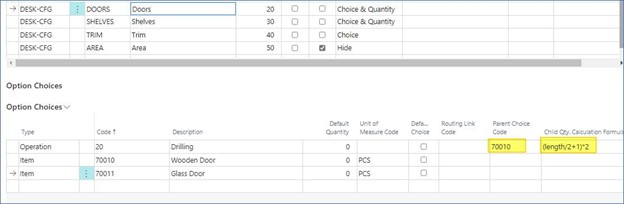
If 70010 is chosen (parent choice), the operation is added with a run time calculated based on the highlighted formula. If operation 20 is an existing operation, this one overwrites it.
The configuration package with demo data (below) illustrates some of the example configuration (e.g., the desk configuration adds an operation on the door choice when choosing wood doors).
Demo data package: PackageCONFIGURATOR.rapidstart
For more information, contact Support.
Still need help?
Ask other Business Central users in the Insight Works community, or send the details to the support team. Include the steps you took and any error message you saw.