
The Production Order Analysis Worksheet feature in Enhanced Planning Pack helps you compare the expected and actual results of a production order. It is useful for investigating differences in material consumption, setup time, run time, and production costs.
For more higher level details refer to https://dmsiworks.com/apps/production-order-analysis
Production Order Analysis was added to Enhanced Planning Pack in version 3.4, and resides within the Routing Analysis app within the Enhanced Planning Pack.
Why use the Production Order Analysis Worksheet?
Use Production Order Analysis when you need to answer questions such as:
- Did the production order consume more material than expected?
- Did an operation take longer than planned?
- Was the actual production cost higher than expected?
- Which component or routing operation contributed to the variance?
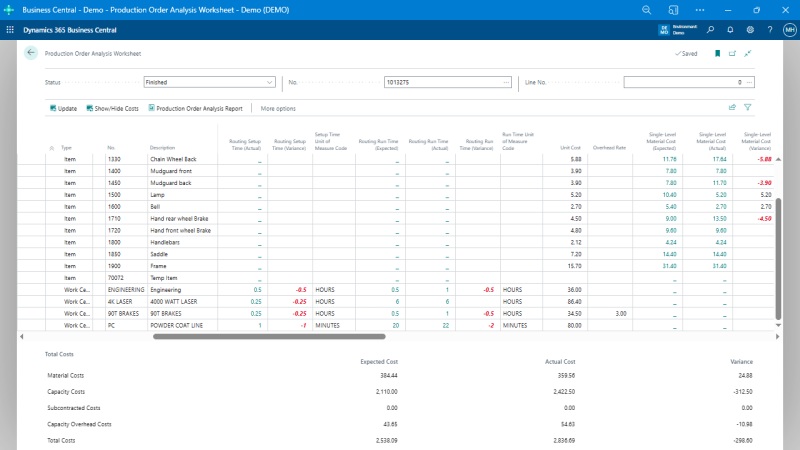
The worksheet presents the production order as a hierarchy of items, components, and routing operations.
Open Production Order Analysis
Search for Production Order Analysis Worksheet in Business Central.
At the top of the worksheet, select:
- Status – select the production order status.
- No. – select the production order.
- Line No. – optionally select a specific production order line.
Leaving the Line No. blank analyzes the production order rather than a single production order line.
Analyze component consumption
For production components, compare:
- Component Quantity (Expected)
- Component Quantity (Actual)
- Component Quantity (Variance)
These values help identify components that were consumed differently than expected.
You can drill down on the Expected and Actual quantities to review the supporting information.
Analyze setup time
For routing operations, compare:
- Routing Setup Time (Expected)
- Routing Setup Time (Actual)
- Routing Setup Time (Variance)
Use these fields to identify operations where actual setup time differed from the expected setup time.
The Expected and Actual values support drilldown for further investigation.
Analyze run time
Similarly, compare:
- Routing Run Time (Expected)
- Routing Run Time (Actual)
- Routing Run Time (Variance)
This is useful when investigating production orders that required more or less processing time than planned.
Analyze production costs
Production Order Analysis also includes expected, actual, and variance information for production costs, including:
- Material cost
- Capacity cost
- Subcontracting cost
- Capacity overhead cost
- Total cost
Both single-level and rolled-up cost information is available where applicable.
The analysis can also include Sales Amount, Gross Margin Amount, and Gross Margin %.
Drill down into a variance
Several Expected and Actual values on the worksheet support drilldown.
When a value appears unexpected, drill into it to review the records contributing to the calculated result. This is particularly useful when investigating material consumption or routing-time differences.
Print the Production Order Analysis Report
Enhanced Planning Pack also includes the Production Order Analysis Report.
The report can show:
- Units
- Actual costs
- Expected costs
- Cost variances
- Sales and margin information
You can select the production order status, production order number, and optionally a production order line before running the report.
Production Order Analysis vs. Routing Analysis
Use the Production Order Analysis Worksheet when investigating the results of a particular production order.
Use Routing Analysis when analyzing routing performance across production activity to identify production-time variation and trends. Routing Analysis is a separate feature within Enhanced Planning Pack.
Example: investigating excess production hours
If a production order appears to have taken longer than expected:
- Open Production Order Analysis Worksheet.
- Select the finished production order.
- Locate the relevant routing operation.
- Compare Routing Setup Time (Expected) with Routing Setup Time (Actual).
- Compare Routing Run Time (Expected) with Routing Run Time (Actual).
- Review the corresponding variance fields.
- Drill into the Expected or Actual values when additional detail is required.
This provides a direct way to identify where the recorded production time differed from the expected routing time.
Still need help?
Ask other Business Central users in the Insight Works community, or send the details to the support team. Include the steps you took and any error message you saw.